
Abstract
With more complex single-shaker test systems, engineers may likely use multiple control accelerometers, selecting an average/weighted average or maximum value. If the device under test (DUT) is fixed at more than one point, and the behavior at the fixing points differs, then the engineer may choose multi-point control. In other test scenarios, an oversized fixture, such as a slip plate, may require control at multiple points. Large slip plates or armatures may resonate during testing, particularly at the ends of free systems.
QUESTION
How do you configure the average of multiple accelerometers for control?
ANSWER
Averaging accelerometers for control is possible in the VibrationVIEW Sine, Random, and Shock software modules.
In the Test Settings dialog, navigate to the Channels tab.
Select the channels to average for control. In the “Combine control channels using” drop-down menu, select the method of control.
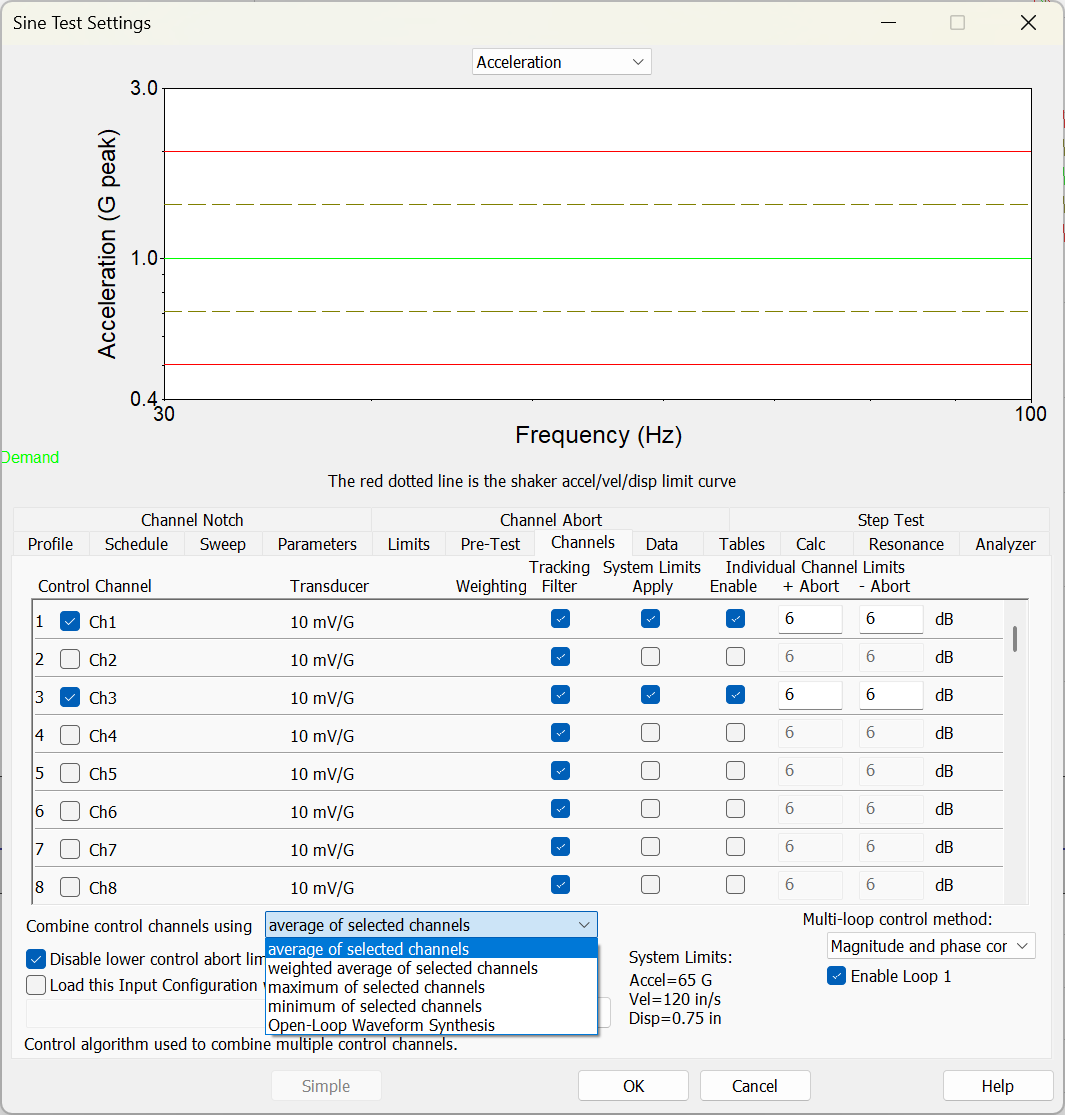
The Channels tab in the Sine Test Settings dialog.
Limits
Navigate to the Limits tab and define the tolerance and abort values under Control Limits (Sine), Spectrum Limits (Random), or Tol and Abort Limits (Shock). The software also requires individual channel aborts when performing multi-channel control. You can define individual abort limits in the Channels tab or the Channel Abort tab (Sine and Random only).
RMS aborts for Random tests also apply to the control trace.