Structural Dynamics Testing
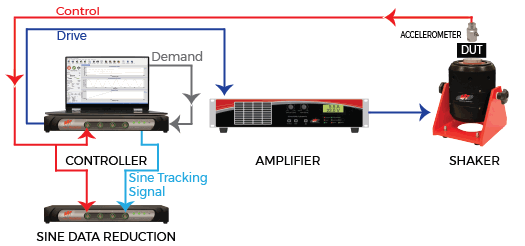
Sine reduction (also called sine processing or sine data reduction) uses the COLA output of any VR controller to configure shaker control with a second instance of VibrationVIEW or a third-party product.
The main controller runs a sine sweep test, likely with user-defined tracking filters. The COLA signal tracks the drive frequency and instantly calculates the amplitude and phase at the frequency value. The VR I/O unit runs the same sine sweep using the COLA signal as the frequency reference, so the tracking filters are applied the same.
Accurate frequency tracking ensures the identification of resonant frequencies for product development and qualification.
Sine Sweep
Run sequences of fixed-frequency sinusoids of a specified acceleration, velocity, or displacement. Test duration options include the length of time, number of sine wave cycles, or number of sweeps.
Additional Features
- Specify linear or logarithmic sweeps
- Change the sweep type while the test is running
- Easily repeat tone sequences with the looping function
- Set individual sweep rates and tolerances by segment
Sine Software
Reporting
The VibrationVIEW software displays the sine sweep results for independent verification of the test results. Generate reports with graphs such as:
- Total harmonic distortion (THD)
- Transmissibility
- Transfer function
In ObserVIEW, you can overlay control software data and ObserVIEW-generated scatterplots to compare analyses, then copy-paste the graph to a Word or Excel file for reporting.
High-channel-count Control
The VR10500 is Vibration Research’s high channel count control hardware for vibration and shock testing. Scalable to 512 channels and compatible with all electrodynamic and servo-hydraulic shakers. Features include up to 256kHz sample rate and 4 outputs for multi-shaker testing.

Sine Data Reduction Analysis
The ObserVIEW software offers several tools for analyzing and reprocessing sine reduction test data. It enables a comprehensive analysis of sine wave recordings as a function of time or frequency.
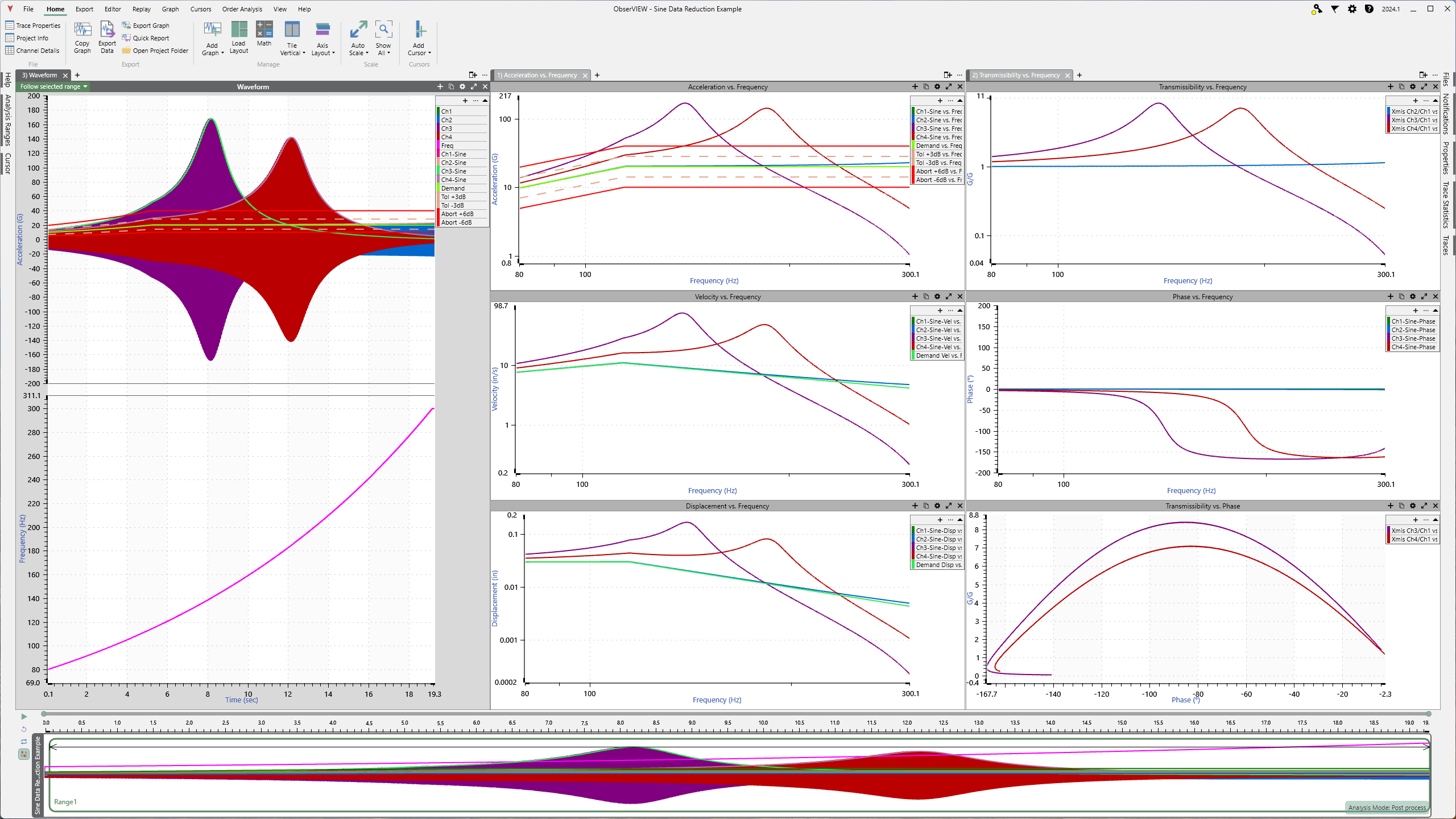
The Math Channels feature includes expressions for post-process analysis that simplify sine sweep data by breaking down the frequency and amplitude components of time-domain signals. This method provides clearer insights than traditional graphs like the fast Fourier transform (FFT) or transmissibility.
- Calculate the frequency of the reference channel’s sine tone
- Track a response channel’s sine amplitude with respect to the reference channel
- Track the peak amplitude of a response channel’s sine tone over time
- Track the phase shift between a response channel and the reference channel
Engineers can also reprocess recorded sine data to duplicate the analyses of the controllers used during testing.
Critical Safety
Many test items in aerospace and other industries are of high value, and close monitoring during testing is crucial. Engineers can configure abort limits for all channels or individual ones.
Additional Safety Options
- Emergency stop (e-stop) button: stop a test without inputting a transient shock (add-on option for the VR10500)
- Drive limits: prevent overdriving the shaker in case of failed accelerometers
- Adaptive feedback: allows for tighter control outside a resonance while ensuring stability at sharp resonances
Virtual Channels
Engineers can reference virtual channels when configuring notches/aborts in Sine, using them in the same way as a response channel from a physical sensor. Virtual channels are the result of user-defined expressions that combine input channels. They perform linear math in the time domain and can reference channels across hardware units.
Virtual Channels turn raw data into insights, eliminating the need to process data in external tools.