
All Software Features

Triggering

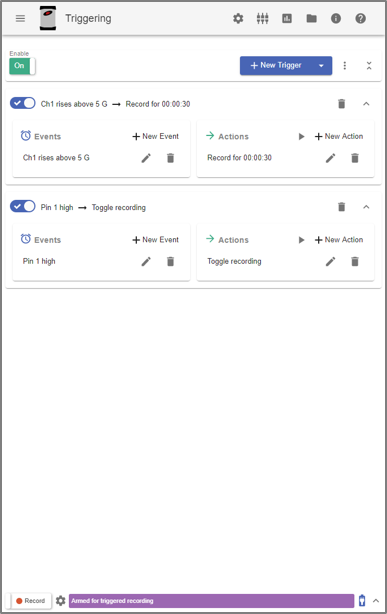
Record data autonomously with VR hardware. In VR Mobile, set up actions to occur automatically following an event; after the trigger, the I/O unit will record data without intervention. This feature saves time and ensures accuracy and consistency during recording.

Download Demo All Software Features

Autonomous Data Acquisition

Save time by acquiring data without intervention. Never miss an event that should be analyzed and replicated in a lab setting.

Events

  • Device Startup
  • Analog Input
  • Digital Input
  • Recording State
  • Power State
  • Time of Day

Define Custom Behaviors

A trigger can execute one or more actions in response to one or multiple events, and multiple triggers can exist independently from one another.

For multiple events, the software executes the action(s) when all events are met. To set up an “or” function for multiple events, you can create multiple triggers to trigger an action in response to any one of the events.

Multiple actions for a trigger will run in order from top to bottom. You can also set a delay in between actions.

Record in the Field

The ObserVR1000 is a portable dynamic signal analyzer for recording vibration data in the field environment. It offers autonomous control capability with the VR Mobile application.

Features

  • Up to 128 inputs
  • 128 kHz sample rate
  • GPS and tachometer compatible
  • 6+ hour battery life
  • On-board storage (SD or PC)

ObserVR1000

Convenient Setup

Define your inputs and triggers once, and the setup is complete.

Example Uses

Transient Capture
Record a transient vibration episode, collecting data 5 seconds before and after the event

Digital Output on Recording
Send a digital output signal while the I/O unit is recording

Record While External Power is Present
Power on the I/O unit and start recording when external power is present; stop recording and shut it down when external power is removed

Transient Event with GPS

Create an input threshold for recording to save processing time. Acceleration below the threshold level will not be recorded. Add the Record for Duration action to record data X seconds before and after the event.

After recording, view the GPS statistics and interact with the map post-process in ObserVIEW.

Multimedia Sync

How Can We Help You?

Contact Us